
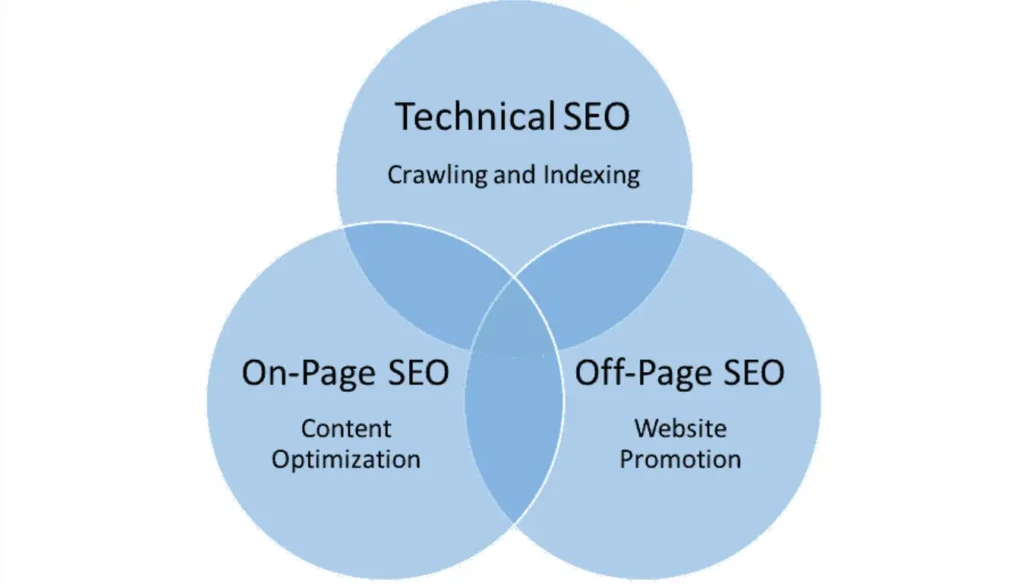
Technical SEO is the procedure of organizing your website in such a way that it can be crawled, indexed and ranked by search engines. On the other hand, Technical SEO is all about the “behind-the-scenes” elements of a site. Examples of these include speed, mobile friendliness, security as well as how search engines access and read the information on your site.
They say content is king but no matter how relevant or useful your content is, it would not be useful if search engines cannot crawl and index its pages. This is why we call it the backbone of any successful SEO strategy.
What are Some Reasons to Improve Your Technical SEO?
There are several reasons to improve technical SEO on your site including:
- Better Search Engine Rankings: If there are any technical issues that prevent easy crawling and indexing by search engines in your website then this can lead to poor rankings. Great content will mean nothing if it lacks sufficient supporting information.
- Page Load Speed has Improved: Websites that load quickly are highly esteemed by search engines. Slow loading pages detract from the user experience, which increases the bounce rate affecting SEO.
- In today’s world, many people use their phones to access the internet so making your site mobile friendly is necessary. In Google, mobile-friendly websites perform better because they are ranked higher.
- Security and Trust: Websites that have HTTPS encryption rank higher in Google. This is very important especially when users need to enter sensitive information.
- Improved User Experience: Enhancing navigation and other technical aspects of a website can make users interact well resulting in better user experience.
Technical SEO for Increasing Website Traffic and Revenue through Search Engines whilst Enhancing User Experience
Technical SEO tools help with various technical tasks. They allow for analysis, trouble shooting and necessary changes aimed at maximum SEO. Here are some of the most beneficial ones:
- Google Search Console: At no cost, this tool helps evaluate how the site is doing. You can track Google’s crawl rate as well as fix indexing problems.
- Screaming Frog SEO Spider: It finds broken links as well as other technical SEO matters like duplicate content because it is a website crawler.
- Ahrefs: Ahrefs is a valuable tool that combines site auditing, backlink analysis and keeping track of how your website performs.
- PageSpeed Insights: It checks the speed of the website and provides suggestions for optimization.
- Google Analytics: You can use it to track user actions on your site; u’ll also find some issues that may be causing your site to slow down.
- GTMetrix: This tests page speed and performance while offering recommendations on how to improve load time.
So how do you do a technical SEO analysis?
To improve your website’s overall performance, start with a Technical SEO Analysis. Here are steps you can take in order to achieve this:
- Crawl Your Website: Use tools such as Google Search Console or Screaming Frog to detect broken links, missing metadata or improper metadata within your own website. Pay attention to any slow loading pages/times within your site.
- Check Mobile Friendliness: You could check if a site is mobile responsive by making use of “Google’s Mobile Friendly Test”.
- Check Page Speed: This will help you know what needs improvement in terms of speed and responsiveness by running websites through GTMetrix or PageSpeed Insights.
- Look For Crawl Errors: From crawl errors detected from Google Search Console fix bugs that might limit search engines from indexing yours.
- Conduct a Metadata Analysis: All your tags and descriptions should be unique and relevant, be sure to optimize them.
SEO is technical and it is good to make sure that no stone is left unturned by taking some actions. Here are the most important performance areas of your site.
Crawling and Indexing
Develop URLs Which are Easy to Crawl
Use simple descriptive URLs, which are short and need to contain keywords. Avoid long URLs with unnecessary parameters.
Build Internal Links
Internal Links can assist in enhancing your site navigation for users while making it easier for search engines to understand your pages.
Robots.txt
What pages should search engines crawl? What pages shouldn’t they crawl? Use this file to specify key words for search spiders you want them to follow through.
SEO Meta Tags
Your tags and descriptions must be relevant, easy to search and understand by your search engine. In addition, concise comments that make the contents more explicit have been added.
How To Use Canonical Tag
You can direct the search engine on what pages should be searched for content by presenting them with your canonical tag. This way, you avoid duplication of content easily.
Using Hreflang Tag
If your website has different versions in different languages, using hreflang tags will let search engines know which content to show users depending on their language or region.
Redirects
Make sure all redirects are working correctly and do not have any problems with page ranking. Pay attention to the details of 301 redirect standards.
404 Page
Design an informative 404 error page with navigational elements that help users find relevant content after finding broken links.
XML sitemap
An xml sitemap helps search engines locate and index your content more efficiently. Submit it to Google search console, ensure it is current and maintained.
How to Fix Rendering Issues?
Rendering issues can be obstacles to search engines trying to read the contents of your webpage. Check for these issues using google console url inspection tool, ensure that your content is accessible by search engines.
How to Improve Your Site Speed?
Do you want to make your site faster? Then you should improve page loading speeds, which is a ranking factor that every website owner needs to consider. Google speed insights will help in analyzing your site and then give recommendations on how it can be made to load faster. Well, during this analysis you need to look for such things as image compression, minifying code and utilizing browser caching.
Avoiding Duplicate Content
Yes, there is a simple solution for this problem. Use canonical tags to indicate the preferred version of a page.
Finding and Fixing Broken Pages
Apart from broken pages, there are many other issues that can result in poor user experience and affect your SEO negatively. Use tools like Ahrefs or Screaming Frog that can help you find broken pages. So how do you fix them? Through updating them with redirect links or relevant content.
Making Your Website Mobile-Friendly
Recent reports show that as Google starts rolling out its mobile-first indexing, mobile sites have taken precedence over desktop versions when it comes to rankings. You can use Google Mobile Friendly Test to see how well your site performs on mobile and adopt a responsive design that works across smartphones, tablets and desktops.
Structured Data
According to search engines, Schema markup or structured data is one way that can help them understand your content easily. It also improves visibility because rich snippets might get displayed more often on search engine results pages (SERPs). Google’s Structured Data Testing Tool is what you need to apply and validate your markup.
Website Security
Use HTTPS encryption to secure your website and improve its ranking.
Google also prefers secured sites as well as credible services offered by their users.
Closing Statements:
Technical SEO is the foundation of any site seeking a top ranking in search engine result pages, improving user experience and beating competition. To achieve success in SEO, it’s essential that certain aspects of the website such as loading speed, mobile-friendliness, crawlability among others are modernized.
Common Questions About Technical SEO
How does technical SEO compare with On-page and off-page SEO?
Technical SEO refers to backend processes and functions of a site unseen by users which make it attractive for both users and search engines. On-Page SEO has content optimization while true off-page optimization has backlinks related with the relevant website.
websites in search engine result pages (SERPs). Technical SEO is an essential aspect of optimizing websites for search engines by improving the user experience and fixing issues such as slow page speed, broken links, and lack of mobile friendly design.
Previously, I have talked about technical SEO basics that affect website success. I want to expound on this a little more to help you understand why it’s so vital in every digital marketing strategy.
When carrying out an SEO audit, there are four big basics that should be considered according to me.
For one to excel at search engine optimization (SEO), understanding the basic fundamentals of technical aspects that rank websites is necessary.